Singapore · Malaysia
Bank statement PDF to Excel, every row checked.
UOB, DBS, POSB, OCBC and Maybank. One clean row per transaction, running balance verified against the bank's own figures, PDF deleted in seconds.
- Deleted within seconds
- Reconciled row by row
- No account needed
- Secure checkout by Stripe
Watch a statement convert
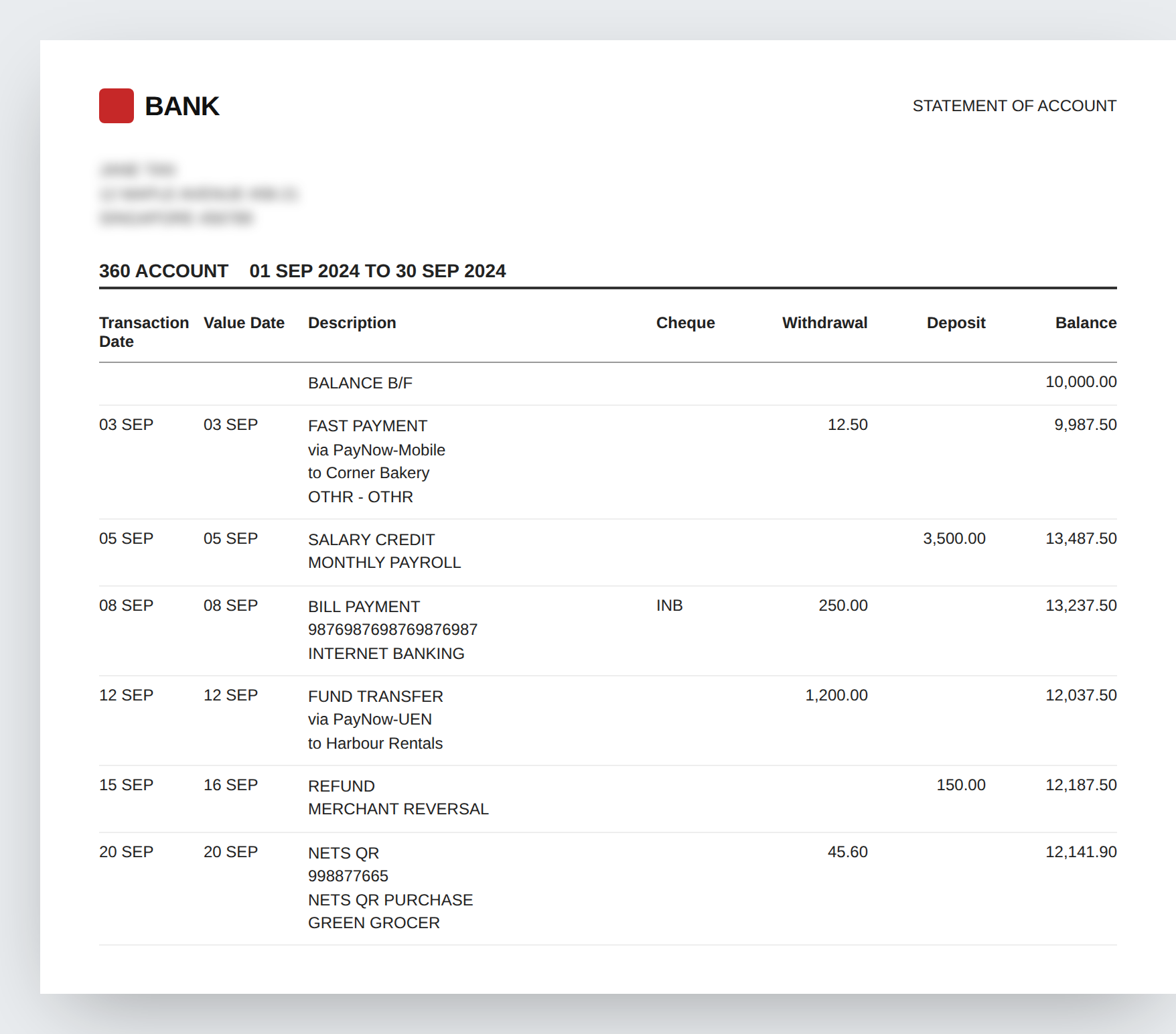
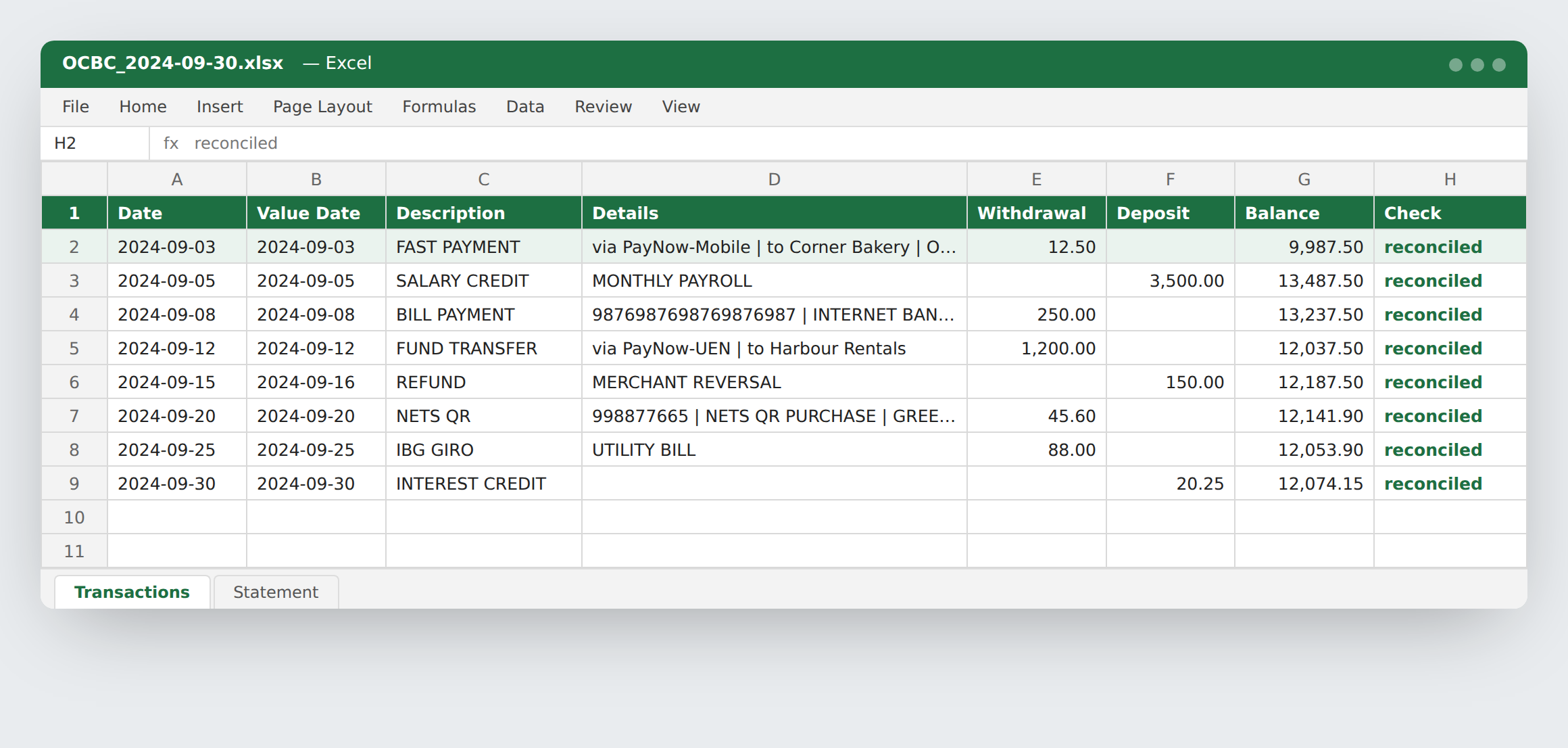
This is the parser's real logic on a sample OCBC statement. Each line is read, assembled into a row, and the balance is recomputed and checked against the bank's printed figure.
Replay| Date | Description | Out | In | Balance | Check |
|---|
From the bank's PDF to a file you can actually use
Multi-line descriptions joined, withdrawals and deposits in the right columns, a Check column confirming every balance, and a second sheet with the account, period and totals. Download the sample file.
Why not just type it in, or ask a chatbot?
Four ways to get a statement into a spreadsheet, and what each one costs you.
| Typing it in | Generic PDF converters | AI chatbots | StatementSheet | |
|---|---|---|---|---|
| Time per statement | 30–60 min | 2 min plus clean-up | 5–10 min plus checking | Seconds |
| Multi-line descriptions | Kept | Split across rows | Usually | Joined into one row |
| Withdrawals vs deposits | Manual | Often merged | Mostly right | By column position |
| Balance verified | No | No | No | Every row |
| What happens to your PDF | Stays with you | Varies by provider | Often retained for training | Deleted in seconds |
| Singapore and Malaysia layouts | Yes | Not specifically | Hit and miss | Built for them |
| Cost | Your hours | US$10–40 a month | Subscription | From S$0.40, no subscription |
Why trust a converter you found five minutes ago
Six things you can verify yourself before uploading anything.
It checks its own work
The running balance is rebuilt from the opening figure, transaction by transaction, and compared to what the bank printed. A row that fails is flagged in the sheet, never silently dropped or corrected.
It never keeps your file
Your PDF exists in memory for the conversion and is deleted before the download starts. No names, account numbers or amounts are logged. Read the privacy page.
No account, nothing to breach
No email, no password, no profile. A paid pack is a key you paste in; the only record is the key, its remaining count, and the receipt Stripe sends you.
Built for these banks
Each supported bank has its own parser tested on real statements: UOB's foreign-currency card lines, OCBC's value dates, Maybank's signed column, DBS consolidated statements. Hosted in Singapore.
See the output first
Download the sample spreadsheet before you upload. If the columns and the Check sheet aren't what you need, you've lost nothing.
A failure costs nothing
If a layout isn't recognised you get a clear message and no credit is used. Send a redacted copy to statementsheets@proton.me and it's usually supported within days.
Your bank not listed yet?
Try it anyway: the beta reader handles most standard Date / Description / Debit / Credit / Balance layouts, and you're never charged for a failed conversion. These are next in line; a redacted sample from you moves yours to the top.
Singapore
- Standard Chartered
- Citibank
- HSBC
- Trust Bank
- GXS
- MariBank
- CIMB Singapore
Malaysia
- CIMB
- Public Bank
- RHB
- Hong Leong
- AmBank
- Bank Islam
- Affin
- Alliance
Send a sample
Black out your name, address and account number. The layout is all we need. Reply usually within two days.
Email a redacted statementSimple pricing. No subscription.
Your first statement each month is free. Buy a pack when you need more; it never expires.
Prices in Singapore dollars. Cards from any country. Failed conversions are never charged.
Questions people ask before uploading
- Is my statement stored anywhere?
- No. It's held in memory for the conversion, touches a temporary file for a fraction of a second so the text extractor can read it, and is deleted before the response is sent. Nothing from inside it is logged.
- What if my bank isn't listed?
- Try it anyway. If the layout isn't recognised you get a clear message and nothing is charged. Send a redacted copy to statementsheets@proton.me and it's usually supported within a few days.
- Does it work with scanned statements?
- Not yet. It reads the PDF the bank generates, which has real text inside. A photo or scan has no text layer. Scanned support is on the roadmap.
- What does a flagged row mean?
- The recomputed balance didn't match the bank's printed balance at that row. Usually it's a layout quirk we haven't seen; the row is kept with its flag so you can check it against the PDF, and we'd like to hear about it.
- Can I import straight into Xero or QuickBooks?
- Yes. Choose "Xero import CSV" or "QuickBooks CSV" as the format and the file matches their bank-statement import templates, with signed amounts and dd/mm/yyyy dates.
- Can I convert several statements at once?
- With a pack key, drop up to 12 PDFs together and you get a zip, one credit per statement. The free conversion is one statement at a time.
- Do I need an account?
- No. The free conversion needs nothing. A paid pack gives you a key at checkout; paste it into the key field. No login, no subscription.
Convert your first statement free
No sign-up. Drop the PDF, download the spreadsheet, and the file is gone from our server before you open it.
Choose statement PDF